Width is the horizontal measurement of a tv stand from one outer edge to the other. Your specific needs, such as the size of your television and the amount of storage you require, determine which width is correct for your space.
Which Width Suits My Situation?
| If this is you | The Width that suits you | Why |
|---|---|---|
| You have a small apartment or a compact bedroom with limited floor space. | 24 to 36 inches | These dimensions allow for a smaller television while maintaining a footprint that does not obstruct walkways. |
| You own a standard 43 to 50-inch television and need basic storage. | 40 to 50 inches | This range provides a stable base for mid-sized screens and enough surface area for a media box or game console. |
| You have a large living room and a 65-inch television or larger. | 55 to 70 inches | A wider base provides the necessary stability for large screens and allows for a symmetrical look where the stand extends past the TV edges. |
| You want a media console to hold a large collection of media, books, or decor. | 70+ inches | Extra width provides the horizontal surface area needed for extensive storage and large-scale home theater setups. |
Tv Stands covered by our own reviews
Prices across these 3 run from $119.99 to $289.99; each one has a full review here.


BELLEZE 48″ TV Stand with 18″ Electric Fireplace
If you have a smaller screen, browse small tv stand options for 48 inch tvs.
$238.99 price checked August 2026
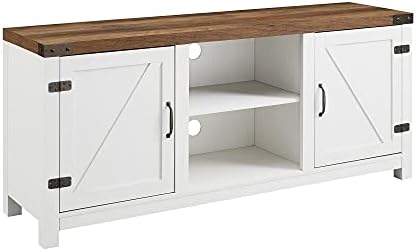
Walker Edison Larae Two-Tone Barn Door Stand
$119.99 price checked August 2026
Read our full Larae Barn Door Stand review
Make sure to also consider the proper depth clearance for tv stands before you buy.
How Do I Measure the Correct Width?
To find the correct width, you must first determine the dimensions of the television you intend to mount or place on the stand. Most manufacturers list the width in inches on the product’s specification sheet or the back of the device.
Finding Your TV Width
Locate the model number of your television and search for the official dimensions. Note that the “viewable” screen size is different from the actual physical width; the outer bezel of the frame adds several inches to the total width. You must use the total physical width of the device for your calculations.
Measuring Your Room
Measure the available wall space where the stand will sit. Use a metal tape measure to confirm the distance between any obstructions, such as doorways, windows, or corners. Subtract at least 2 inches from the total wall width to ensure the stand is not squeezed into a tight fit, which can make it difficult to clean or move.
The Stability Rule
A standard rule of thumb for stability is that the stand should be at least as wide as the television it supports. If the television is wider than the stand, the center of gravity becomes unstable, creating a tip-over hazard. For a balanced aesthetic, many users choose a stand that is 3 to 6 inches wider than the television on each side.
What Happens if the Width is Too Small or Too Large?
Choosing a width that is too small for your television creates a significant safety risk and a poor visual result. If the base of the stand is narrower than the screen, the unit may tip forward or sideways, especially if the television is heavy or top-heavy.
Risks of a Narrow Stand
A narrow stand leads to structural sag if the weight of the television is concentrated on a small surface area. Even if the stand does not tip, the television may overhang the edges, making it difficult to access the ports or buttons on the side of the device. This also creates a visual imbalance where the television appears to “float” precariously over the base.
Don’t forget to verify the ideal height for tv stands for your viewing comfort.
Choosing a width that is too large for your space can cause functional problems in your room. If a console is wider than the wall segment it is meant to occupy, it may block traffic flow or prevent doors from opening fully. Large units also consume floor space that might be needed for other furniture, such as a chair or a side table.
Risks of a Wide Stand
A stand that is significantly wider than the television can make the room feel crowded. If the stand extends far beyond the edges of the screen, it may look disconnected from the media setup. In small rooms, a wide unit can also create a “tunnel” effect where the furniture dominates the visual field, making the area feel smaller than it is.
What Do I Do if I Fall Between Two Widths?
If your measurements suggest a width that falls between two standard sizes, you should prioritize the stability of the television. When you are between two values, choose the wider option to ensure the base of the stand remains wider than the footprint of the screen.
Prioritizing Stability
A stand that is slightly too wide for a space is easier to manage than a stand that is too narrow for a television. If a wider stand will physically fit on your wall but is larger than you originally planned, it provides the necessary support to prevent structural sag and tip-over hazards.
Managing Tight Spaces
If you are in a situation where the wider option will not fit in the room, you must reconsider the television size. You cannot safely place a large television on a narrow stand. In these cases, moving to a smaller television is the only way to ensure the setup is both safe and functional. If the width is a hard limit due to a doorway or wall, the television must be sized to fit within that width’s capacity.
Check the return and sizing policy of the manufacturer before ordering. Knowing the specific window for returns can provide a safety net if the dimensions are slightly off once the unit arrives in your home.